Students Centric
Placements Report
Trackable results, real numbers
Reviews
Proven success, real voices
Trainers
Expert-led, Industry-Driven Training
Life at IIDE
Vibrant Spirit student life
Alumni
Successful Journeys, Inspiring Stories
Learning Centre
Webinars
Blogs
Case studies
Live, Interactive Masterclasses
Fresh Insights, quick reads
Real-life, Industry relevant
More
Hire from us
Hire Top Digital Marketing Talent
Work with us
Join Our Team, Make an Impact
Customised Training
Personalised digital marketing training for your company
Refer & earn
Simple, easy rewards
Contact us
Get the answers you need
About us
Know more about IIDE
Explore all course options

FOR FRESH GRADUATES
Post Graduation Program in Digital Marketing & Business Strategy- Ideal for Age: 20–25 Years

Can’t decide? Explore all our
Digital Marketing Courses
COMPARE BOTH OUR PROGRAMSOffline
Offline AI Courses with Dual CertificationsIndustry-Aligned TRACKMost Popular
UG Program in Digital Business & Entrepreneurship- Ideal for 12th Pass out / FY Degree Student

PARTNER PROGRAMS






Can’t decide? Explore all
BBA In Digital Marketing Colleges
Orginally Written by Karan Shah
Updated on Sep 25, 2025
Share on:


How much does it cost to advertise on Facebook?
The average CPC (Cost Per Click) for a Facebook ad is between $0.5 and $3.5. Given below is the Facebook ads cost data from April 2020 – April 2021.
And for those who don’t know what CPC is. It is the cost you are paying for each click to your ad campaign on Facebook.
CPM, i.e. Cost per 1000 impressions is another important facebook ad cost metric that an advertiser keeps their eye on.
According to the data the average Facebook CPM was between $2 – $20.
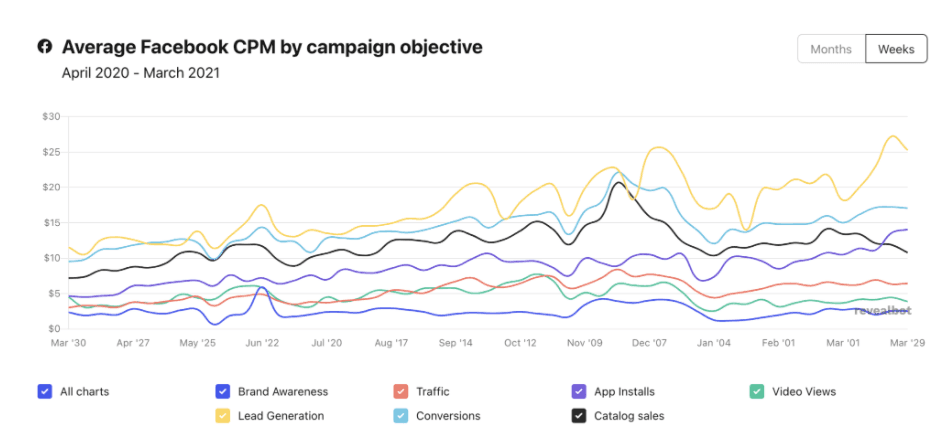
Thus, answering the question in simpler terms, your Facebook ad will cost the amount you are willing to bid for it. And this will further decide your frequency of ads in comparison to your competitors.
Facebook Ad Bidding is a unique and complex concept and the best way to understand it is to learn from people who are practicing it or industry experts.
Bidding is so important because it can make or break your campaign. Thus, we’d recommend you to get in touch with any of your friends/colleagues who does Facebook advertising to best understand how the bidding works.
But if you do not have the necessary contacts, then opt for this Online Facebook Ads Course which teaches you every detail of Facebook Ads with great emphasis on their bidding system.
You will also be taught how the Facebook advertising system works along with hands-on practice and mentor-led live doubt solving sessions all from the comfort of your home.
So let’s also briefly understand how the Facebook ad system works.
How does Facebook advertising work?
According to Facebook.com,
Advertisers define who they want to reach based on factors such as interests, age, location, and more.
Facebook shows such adverts to the people most likely to be interested in their products, services, and causes. Apparently, Facebook is very particular about its customers’ experience.
Let’s see how can you advertise on Facebook.
It starts with your target audience. Facebook’s ad targeting options encompass the following parameters, allowing you to segment your audiences for your adverts.
1. Demographics
This includes location, age, language, gender, education, work, life events, etc.
2. Interests
This section includes business & industry, entertainment, family & relationship, fitness & wellness, Technology, etc.
3. Behaviors
This includes media, purchase behavior, digital activities, seasonal & events, etc.
4. Connections
This targeting option allows you to reach out to people who are interested in your business page, app, or event. You can select the users who have performed a specific action such as liked your page, used your app, who are going to your event, etc.
5. Remarketing
When you use Facebook ads for remarketing campaigns you have the option to target the people who visited your website, custom lists of emails, custom list of the phone numbers, and custom list of Facebook user IDs.
Must Read: Learn all about Facebook Remarketing
Once you have finalized your target audience and location, you will have to choose the type of ad that you want to run. It could be a story, a post a carousel, or a video format Ad. Given below are some of the ads that you can create for your business.
Image Ads
These are the easiest type of Facebook ads to create. It’s as simple as using an eye-catching image and adding some ad content to the rest of the ad.
But if you use much text on your actual image then Facebook’s algorithm may serve your ads less. These ads can be used for a variety of purposes, including raising brand awareness, selling goods, etc.
Video Ads
These are almost similar to image ads, you just need to replace the image with a video. According to Facebook using a 15 second or less video for your ads may result in more user engagement. Try to create a lasting impression by telling your story within 15 seconds.
Slideshow Ads
You can make a slideshow for your ads on Facebook by using many photographs. Facebook has certain options in the ad design level that allows you to add effects to your slideshow and music too.
Carousel Ads
These types of ads allow you to show up to 10 images or videos in your ad. If you want to show multiple aspects of your business or the product then this would be the best option for you. Users can view your message by swiping through the carousel at their leisure.
Lead Generation Ads
If you are a company that relies on lead generation to survive and thrive? This ad type might be just what you’re looking for. This ad type allows you to collect user data directly on Facebook, which you can subsequently use in your CRM software.
You can ask for any information you require, but keep in mind that you should only ask for what you truly require. People don’t like giving out too much of their information as it is.
Apart from the above-mentioned ads, a few more types of ads that can be opted for on Facebook are:
Canvas Ads
Collection Ads
Offer Ads
Post Engagement Ads
Event Response Ads
Page Likes
Knowing what each of these ads caters to and how they can benefit you is important to make the right decision. Consider equipping yourself with a master course before you begin advertising.
The next step in Facebook advertising is to form the creative for the type of ad you chose. Always try to keep your creatives engaging and relative to your audience. Follow the guidelines by Facebook such as the maximum number of words allowed in a copy, words/languages that are restricted, sizing of the creative, etc.
Comply strictly with the guidelines of Facebook otherwise, they might not run your Ads. Given below are some important points that you have to keep in mind while placing an ad on Facebook.
- Don’t advertise Prohibited products
- Be careful while advertising restricted products
- Do use high-quality, relevant, and truthful creatives
- Don’t link to an irrelevant, poorly designed landing page or URL
- Don’t misuse Facebook or Instagrams brand assets
- Don’t use adult content
- Don’t use language which is irrelevant
- Do not include more than 20% text in any image
- Do not promote sensational content
In case you’re confused between creatives and want to find out which one might work for you, Facebook’s got a hack for that too. You can use the A/B testing option wherein you can run 2 different creative copies for the same target audience.
The first copy will be shown to 50% of your audience and so on. Then you can run the campaign and analyze which creative worked the best for you.
And lastly, comes the most crucial part of Facebook Advertising, which is bidding. As we discussed above, bidding is the amount of money you are willing to pay for your Ad.
And it is also important for us to understand that how to bid for an ad or how does the Facebook ad auction works.
The steps leading up to the Facebook ad auction are as follows:
- Firstly the advertiser will log into the Ad Manager to create an ad campaign.
- The advertiser has to choose their daily budget (or the maximum they’ll spend each day)
- They will select what actions they will pay for, like views, clicks, or downloads.
- After that, they will have to build their audience based on the demographics, interests, etc. of their target audience.
- Then they’ll add their creatives, like ad copy, images, and videos.
- Then the advertiser will approve and launch their ad.
Now when there’s a potential chance to show an ad, the Facebook ad auction happens:
- Facebook grades every potential ad’s bid, estimated action rates, and ad quality.
- Facebook uses estimated action rates and ad quality to determine ad relevance.
- Facebook generates an ad’s total value, based on the bid, estimated action rate, and ad quality.
- Facebook delivers the winning ad – or the ad with the highest total value.
And based on the ad auction you can tell which metrics matter most to your ads and their costs:
- Ad bid
- Estimated action rate
- Ad quality
- Ad relevance
You can also lower your Facebook ad cost by optimizing these metrics, like improving your ad’s quality and relevance to the user.
Tip: According to Facebook, the ad which is more relevant, will cost less and get more facetime with users.
It may sound complex at first but the trainers at IIDE have simplified this process into easy learning formats with real-life examples and projects in this Online Facebook Ads Course.
This is exactly how Facebook Advertising works. We have summarised this into a checklist below. Keep it handy so that you never miss out on anything.

Is Digital Marketing the Right Career for You?
Find out in a free 45-min masterclass · Career paths, roles and growth explained · By Karan Shah, Founder & CEO, IIDE

Is Digital Marketing the Right Career for You?
Find out in a free 45-min masterclass · Career paths, roles and growth explained · By Karan Shah, Founder & CEO, IIDE
Checklist To Become an Expert at Facebook Advertising
Consequently, all you need is 4 things to be a Facebook Ads expert:
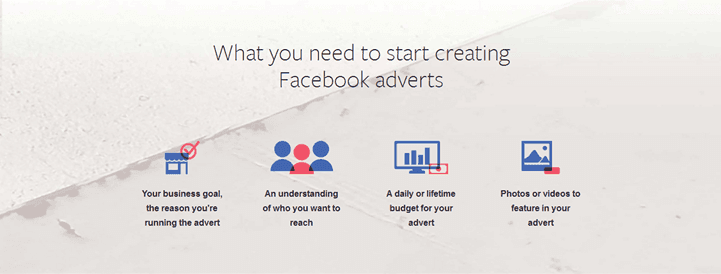
- Why do you want to make this ad? (Objective)
- Whom do you want to reach? (Audience)
- How much do you want to spend? (Budget)
- What do you want to feature as an ad? (Picture, Video, Carousel, etc)
Once you’re set with this, you will be able to successfully run Facebook Ads. But remember, that sometimes your campaigns might fail or not work as expected.
There is a lot of scope of trial and error in this and that’s how you keep learning and keep getting better at it. The ones who have failed at this may tell you horror stories on Facebook advertising.
But ultimately, it’s all about mastering this and learning from your mistakes. Do not turn your back to Facebook Advertising due to one failure as you will be losing out on many opportunities.
And not just with Facebook Advertising, but there are so many different digital marketing skills when used correctly, can bring in such great results at comparatively lesser costs.
Read some case studies on digital marketing efforts and strategies of top companies to understand how they do it and take the best tips and tricks from there.
And if you want to start integrating digital marketing in your business, consider signing up for this 3-month Online Digital Marketing Course in India to identify the best digital marketing opportunities for yourself.
Let experts help you so that you’re on the top of the game and are exploiting every opportunity that presents itself to you.
We have just seen all about Facebook Advertising. Till now you must have understood that Facebook Advertising is a dynamic concept.
Right from international brands to local retail outlets, everyone is competing to reach out to an appropriate target audience.
And if you want to learn step-by-step with a guide of how to do Facebook advertising, then you can also check out our blog on “A Beginner’s Guide to Facebook advertising”.
We would appreciate your views on this, so hit us up in the comments section below!
Want to Know Why 2,50,000+ Students Trust Us?
Dive into the numbers that make us the #1 choice for career success



MBA - Level
Post Graduate in Digital Marketing & Business Strategy

Best For
Fresh Graduates

Mode of Learning
On Campus (Mumbai & Delhi)

Starts from
Nov 27, 2026

Duration
11 Months

Live & Online
Advanced Online Digital Marketing Course
Best For
Working Professionals
Mode of Learning
Online
Starts from
Nov 2, 2026
Duration
4-6 Months

Offline
Top AI Courses to Make You Future Ready!
Best For
AI Enthusiasts
Mode of Learning
2–5 Month Program
Starts from
Nov 24, 2026
Duration
Flexiable

Offline
Undergraduate Program in Digital Business & Entrepreneurship
Best For
12th Passouts
Mode of Learning
On Campus (Mumbai)
Duration
3 Years

Offline
Degree In 2026 ≠ Enough Degree + Digital Skills = Future-Ready
Best For
12th Passouts
Mode of Learning
At IIDE Campus
Duration
3 Years
Recent Post
Digital Marketing Courses Nearby
You May Also Like

Founder and CEO at IIDE
Karan Shah is the Founder and CEO of IIDE – The Digital School, Asia’s premier digital marketing institute. With over ten years of hands-on experience in the digital marketing industry, Karan has played a pivotal role in empowering thousands of students to forge successful careers in this ever-evolving field.
His vast expertise encompasses various areas such as paid search, social media marketing, programmatic marketing, and much more. Karan's passion for education, teaching, and public speaking led him to establish IIDE, where he offers world-class digital marketing education designed to meet industry standards.
To date, he has trained over 60,000 students and worked with more than 25 corporates, sharing his knowledge through both online and offline platforms. A Harvard Business School alumnus with a specialisation in E-commerce, Karan is also an accomplished Tedx speaker. His industry insights and teaching excellence have earned him a prestigious role as a visiting faculty member at India’s top management institutes, including the Indian Institutes of Management (IIMs).